Buoy

CRM

IT

PEO

CRM

Your All-in-One

Stop Choosing Between Bills and Care

Healthcare rules are tightening, the One Big Beautiful Bill Act of 2025 (OBBBA) is changing the game and more than 80% of Americans still can’t comfortably make it from paycheck to paycheck. At the same time, chronic conditions are climbing with no real relief in sight.

CHAMP is designed to punch back. The CHAMP Plan helps employers unlock tax-advantaged dollars to fund meaningful, everyday healthcare, virtual care, preventive support, useful resources, while also boosting employee take-home pay and protecting employer margins. Less waste in taxes. More care, more cash flow, same payroll.

Buoy

CRM

IT

PEO

CRM

Your All-in-One

How the CHAMP Plan Turns Tax Savings Into Everyday Healthcare

The CHAMP Plan by Champion Health, brought to you by Buoy, is a Section 125 health benefit program that uses pre-tax dollars to fund real, everyday healthcare employees actually use, and puts more money back into their take-home pay.

Instead of asking employers to spend more, CHAMP helps reallocate existing tax exposure into a curated package of preventive, virtual and chronic-care services that sit on top of your existing major medical.

Built-In Protection for Your Entire Section 125 Stack

Through Harbor Shield, CHAMP doesn’t just add benefits; it helps protect your Section 125 benefit stack with a contractual audit-defense layer. That means if the IRS ever questions how your Section 125 program is structured or administered, you have a vetted tax-attorney team and a defined legal budget ready to respond, not surprise bills or scrambling.

Employees

More usable healthcare, virtual care and support services, plus a potential increase in take-home pay without raising gross wages.

Employers

Stronger margins, more competitive benefits, and Section 125 programs backed by Harbor Shield audit defense instead of “hope nothing goes wrong.”

Designed for Today’s
Benefits Landscape

According to the American Medical Association, OBBBA-era cuts and regulatory shifts are putting increased pressure on Medicaid and ACA coverage, forcing employers to stretch every benefits dollar further. CHAMP is engineered for that reality: pairing Section 125 tax efficiency, Harbor Shield’s audit-defense protection, and ERISA 3(16) administrative support to help keep your plan compliant, defensible and actually useful for your people.*

*This overview is for informational purposes only and is not tax or legal advice. Employers should consult their own advisors regarding OBBBA, ERISA and Section 125 plan design.

How CHAMP Turns Tax Savings Into Take-Home Pay and Everyday Care

Plan integration

Buoy sets up the CHAMP Plan inside your existing payroll under a Section 125 structure. That means no extra admin or separate deductions. CHAMP runs alongside your current benefits, keeping payroll compliant and simple while unlocking tax savings that fund new healthcare services for your team.

Monthly engagement

Each month, employees complete one quick engagement, like watching a short video in the HealthWallet app or using a covered service. These simple, health-forward actions keep people plugged into preventive care and support, rather than only contacting the system when something goes wrong.

Tax-advantaged payout

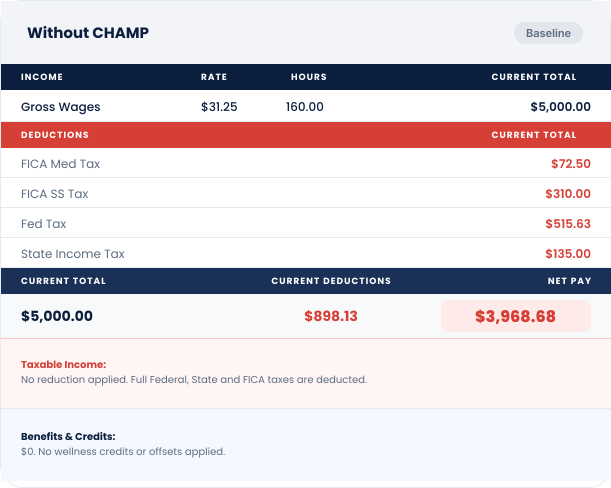
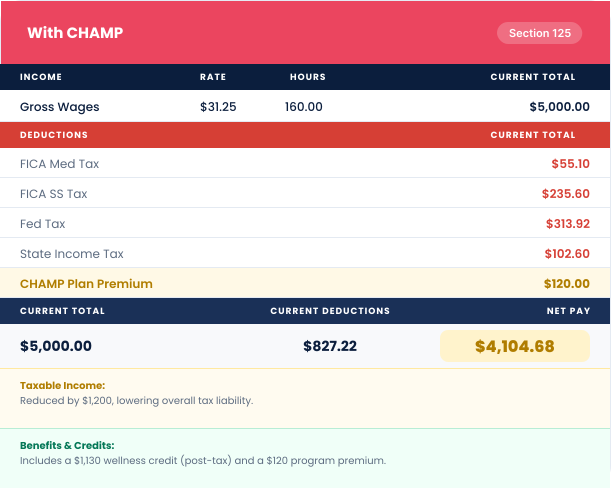
That engagement unlocks a monthly claims payment that both reduces taxable wages and helps cover everyday healthcare costs. Employees typically see more take-home pay plus easier access to virtual care, coaching and other CHAMP benefits, without employers having to increase gross wages.

Employees usually take home more money and gain practical care access, employers cut FICA costs and strengthen their benefits package, and the dollars that used to disappear in taxes are redirected into real, usable healthcare.

Benefits That Count

For Employees

Unlimited $0 copay primary and urgent care visits

Preventive care is 100% covered

Mental health and telemedicine for the whole family

Prescription savings are designed to keep health savings account (HSA) eligibility

Virtual vet visits for your pets at home

Funded by reducing employee tax exposure. Excess savings increase take-home pay.

For Employers

Save over 7.65% on reduced wages through FICA relief

Boost retention with a standout benefit that doesn’t cost extra wages

Simple Buoy-managed payroll integration

Works with or without major medical plans

How It Works

Even better:

Those CHAMP savings can offset a significant portion of the already low cost of Buoy, making it easier than ever to get full human resources (HR), payroll and compliance support without adding budget strain.

Extra Power for the Service Industry

Running a restaurant, bar, salon, hotel or other tipped business? Combine the CHAMP Plan with AAS’s FICA Tip Credit recovery for even bigger savings:

For Workers

Switch from 1099 to W-2 inside BuoyPEO to eliminate self-employment tax, pay no tax on tips, capture both sides of FICA savings and still qualify for the 20% qualified business income (QBI) deduction.

For Employers

Claim $1,900–$3,000 per worker from the IRS FICA Tip Credit while reducing your own payroll tax burden and offering meaningful benefits.

This bundle enables the service workforce to retain more and allows employers to stand out with a benefit that costs less but delivers more.

Learn more about FICA Tip + CHAMP Savings

FAQs

How does Buoy fit into the CHAMP Plan?

Buoy is the partner that makes the CHAMP Plan simple to offer. We handle the payroll setup, compliance and ongoing support so employers can add CHAMP seamlessly. That way, your team receives the $0 copay care and larger paychecks, while you save on FICA taxes without additional administrative work.

Does CHAMP include audit protection?

Yes. Courtesy of CHAMP, every employer also receives Harbor Shield MEC Coverage, which provides full IRS audit defense for their Section 125 Plan structure. It’s built-in protection that gives employers added peace of mind, ensuring their savings and compliance are fully backed.

What is a Section 125 Plan?

A Section 125 Plan, also known as a “cafeteria plan,” is an IRS-approved benefit structure that allows employees to pay for certain benefits with pretax dollars. In the case of CHAMP, it’s what makes the tax savings possible, reducing taxable wages, lowering payroll taxes for employers and boosting take-home pay for employees. The best part? Buoy and CHAMP handle all the compliance and setup, so it’s simple and easy to get started.

Is this a replacement for health insurance?

No. The CHAMP Plan is not intended to replace traditional health insurance; it works in conjunction with major medical coverage or serves as an affordable MEC plan on its own. Think of it as the first line of defense: Unlimited doctor visits, preventive screenings and telemedicine support, with the bonus of putting more money back in employees’ paychecks. BuoyPEO makes it easy to integrate into your existing benefits strategy.

What if employees don’t engage every month?

There’s a built-in cushion, so nobody is left out. Employees receive a 30-day grace period and the opportunity to “catch up” on engagement to unlock their claims payment, even if they miss a month. CHAMP also incorporates Current Procedural Terminology (CPT)-coded activities into its communications and emails, ensuring employees have multiple touchpoints for engagement and interaction. This not only makes participation easy but also strengthens compliance. Best of all, there’s never a debit without the corresponding credit, so the math always balances in the employee’s favor.

Does this affect HSA eligibility?

No. The prescription program within the CHAMP Plan is carefully structured to preserve HSA eligibility, allowing employees to continue taking advantage of these tax-advantaged savings accounts. Employers and employees can feel confident that adding CHAMP won’t interfere with other benefits they already rely on.

Who can enroll?

The CHAMP Plan is flexible enough to include full-time, part-time and even seasonal employees, as long as they meet the minimum tax exposure threshold. For the small minority who don’t, employers can choose to sponsor their participation using part of their own FICA savings, ensuring everyone can benefit. CHAMP integrates directly into payroll, automatically enrolling all eligible employees; there is no need to wait for an open enrollment period for other benefits.

How soon do employees see results?

Employees usually notice the difference right away. After the first month of engagement, tax exposure is reduced and take-home pay often increases, making the CHAMP Plan one of the rare benefits that feels immediate and tangible. Additionally, CHAMP can be implemented and operational within 30 days of the employer signing the Plan Document, allowing employees to start benefiting quickly.

What is eCredable?

eCredable provides credit-building services to people trying to build stronger credit scores. Good credit scores are essential to receiving better financial terms when applying for credit cards or any type of loan.

How does eCredable Business Lift work?

eCredable Business Lift can help raise your business scores at multiple business credit bureaus simultaneously! Included in eCredable Business Lift plans, your subscription is reported as a new account to D&B, Experianand Equifax. D&B adds this account to your D&B credit report, which helps strengthen your credit profile. Experian and Equifax recognize this as a NET 30 account and will help you raise the following credit scores:

1. Experian Intelliscore
2. Equifax Credit Risk Score

Additionally, eCredable enables you to report eligible business accounts to Equifax to raise your Equifax business credit score!

You can automatically link and report unlimited accounts with companies we connect to. We connect to eligible utility companies, vendors, suppliers and business service providers across the U.S. When linking your accounts, we can securely download your account details and up to 24 months of payment history directly from your online account on the provider's website. Then, the accounts are automatically reported to Equifax monthly.

Who does eCredable report to?

Included in the eCredable Business Lift plans, the subscription is reported as a new account to D&B, Experian and Equifax. D&B adds this as a tradeline to your D&B credit report which helps thicken your credit file. Experian and Equifax recognize this is a NET 30 account and will help you raise the following credit scores:

1. Experian Intelliscore
2. Equifax Credit Risk Score

Additionally, business accounts that you link can be reported to Equifax.

When does eCredable report?

eCredable reports to the participating business credit bureaus on the 1st of every month.

How do I cancel my account?

We make it as easy to cancel as it is to sign up. You can cancel your eCredable Business Lift subscription anytime through your account dashboard. Please follow these steps to cancel:

1. Log in to your eCredable Business Lift account [click here].
2. On your dashboard, click "Subscription.
3. "Click "Cancel Subscription" and confirm your cancellation.

By Canceling Your Subscription, You'll Lose Access To:
1. Tradeline Reporting: eCredable subscription tradeline reporting to D&B, Equifax and Experian helps you raise your business credit scores.
2. Non-Financial Account Reporting: Additional reporting to Equifax that helps raise your Equifax business credit scores.
3. Business Growth: Qualify for better business credit cards and funding opportunities to grow your business.

If you choose to cancel despite the valuable benefits of eCredable Business, please follow the steps above. However, if there's anything we can do to improve your experience or address your concerns, please don't hesitate to let us know. We're here to help.

How do I contact eCredable Care?

We offer 24/7 online support via Eva (eCredable Virtual Assistant), online tickets, LiveChat and an interactive help center where you can find FAQs, how-to guides, videos, a variety of topics related to credit and much more. eCredable Care team members are real, friendly humans. We love answering questions, solving problems and helping you on your lifelong credit-building journey. We use various technologies to provide support effectively and efficiently:

  • We can instantly view your profile, account activity, system details and other information so we can effectively answer your questions.
  • We frequently ask you to send us screenshots, videos and links to help us see what you’re seeing. We can also send you screenshots and videos to guide you in the right direction.
  • It's faster. We can quickly get to the bottom of your questions without putting you on hold.
  • Security is our #1 priority. We can immediately verify your identity and online support keeps detailed records in one place. This ensures nothing gets lost in translation if we need to escalate your issue. We'll always have access to previous tickets so you won't have to repeat questions.

If you need help, please use the following options.

1. EVA, eCredable Virtual Assistant - She's available 24/7/365 by clicking the help bubble in the bottom right-hand corner of the site
2. eCredable Care Ticket - agents monitor tickets 24/7 and reply within 24-48 business hours. This can be found here
3. eCredable Care LiveChat - agents are available on the site Monday - Friday between 9 AM and 5 PM EST on eCredable
4. eCredable Care Help Center - this is available 24/7/365. You can find FAQs, how-to-videos, a variety of topics related to credit and more here

eCredable phone number: 888-732-7337

How much does eCredable Business cost?

To see the eCredable Business products pricing page, go here!

When will my account report?

eCredable reports monthly! So, you can expect your accounts to be reported within 30 days.

How is business credit used?

When your company applies for a line of credit, the creditor will check one or more of your business credit reports and their associated scores. A creditor can be a supplier (like an office supply company) or a lender (like a bank, credit union, or credit card company). There are a variety of “business credit bureaus” that collect and manage information about your company. D&B, Equifax, Experian, and Creditsafe are examples of some of the more well-known repositories of business credit information.

What if my utility account/business service provider is not listed?

No worries! You may still be able to report that account through On-Demand Account Verification. To learn more about On-Demand Account Verification, go here.

Does eCredable provide business credit scores?

No, eCredable does not provide business credit scores.

Is eCredable secure?

Yes! All of your personal information is protected in a secure database using multi-layer security and data encryption. State-of-the-art security measures are designed directly into the eCredable platform.

How does eCredable impact my credit?

Business credit profiles are used to generate credit reports and credit scores that lenders, vendors, and suppliers use when evaluating your business credit. Adding accounts with positive payment history to your business credit files improves your business credit scores and increases your ability to qualify for affordable loans and credit lines

What types of accounts can I report?

It would be easier to say which accounts you CAN'T report! With eCredable Business Lift, you can report just about any business account used in your business operation as long as it is being paid monthly, bi-monthly, or quarterly.

The following account types are NOT ELIGIBLE to be reported to participating business credit bureaus:

  • Accounts not in the business name
  • Personal accounts already reported to the National Credit Reporting Agencies (Equifax, Experian, or TransUnion), such as mortgages, credit cards, loans, etc.
  • Accounts with utility companies, vendors, or suppliers that cannot be reached by phone, fax, or email. Online services with no telephone support are not eligible.
  • Utility companies, vendors, or suppliers that cannot be verified as a legitimate business entity by Name, Address, White or Yellow Page listing, Secretary of State listing, BBB Listing, and/or other verification methods.
  • Accounts on a semi-annual or annual billing cycle
  • Accounts closed or no payments made in the last 24 months
  • Business credit counseling services
  • International accounts

To learn more about how you can report your business accounts with eCredable, see the "How do I link accounts?" article here!

Why doesn't eCredable ask for my DUNS number?

D&B does not require eCredable to collect your DUNS number for reporting purposes. When eCredable reports your eCredable Business Lift subscription to D&B, we report your business name, address and EIN. D&B uses this information to match your eCredable Business Lift subscription to your D&B credit file

How does business comparison and benchmarking work, and where does the data come from?

Benchmarking is a process where you measure your company's success against similar companies to assess the performance gap that can be closed by improving your performance. Studying other companies can illuminate what you need to focus on to enhance your company’s efficiency and profitability to become more competitive.

The data that powers benchmarking in Business Lift+ comes from the tax return data of over 30 million anonymized businesses in the United States. Your firmographic information is used to help compare the tax data of your business so that the metrics you see represent benchmarks to similar businesses.

Firmographic data is information that can be used to categorize organizations, such as geographic area, number of customers, type of organization (by NAICS code), industry, number of employees and so on.

Designations such as public or private corporations, non-profits or charitable organizations, are important and relevant data. Data such as name, address, or CEO are not part of the firmographic description of a company.Benchmarking data is based on the most recently available business tax returns from the IRS

How should I interpret the data presented in eCredable Business Lift Insights?

All of the information available to you with eCredable Business Lift Insights was carefully prepared to allow you to use this information without any further direction. If you need further assistance in interpreting the information, you should consult your accountant or banking professional. They are best suited to address questions unique to your particular business situation.

I need help with eCredable Business Lift Insights, who should I contact?

For issues related to using eCredable Business Lift Insights, please contact eCredable Care through our Help Center.

https://ecredablebusinesscare.zendesk.com/hc/en-us

Can I export this information from Business Lift Insights?

No, unfortunately we do not have this functionality at this time. We routinely improve the capabilities of the product, so stay tuned for updates.

How does eCredable protect my information?

As a company involved with sensitive business data, best in class security is vital. No compromises. Built using technologies tried and tested in the finance industry our system utilizes technology and software best practices. We continue to test and re-test our architecture to ensure it meets the high level of security our customers expect.

How often does eCredable Business Lift Insights update my data?

eCredable Business Lift Insights checks your accounting data once every 24 hours. If there have been any changes since the last update, the data will be updated and re-analyzed. Due to the timing of this update cycle, it may take as long as a full day before you see any changes to your information.

My numbers don't look right, what should I do?

You should try to re-sync your data. If there was an interruption in the process, some or all of the information may not have been correctly updated.eCredable Business Lift Insights is using your accounting package's data to display your information so make sure your accounting data is up to date.

If something still looks wrong, please contact us through our Help Center:

https://ecredablebusinesscare.zendesk.com/hc/en-us

What does my cash number represent? How is it calculated?

The historical cash number is derived from the bank account balances we see in your accounting package along with any transactions in the past. Forecasted cash is a combination of the cash balances we see along with our recurring forecast and events that you may have added. High and low projections of cash indicate the variation that may have been implied by your accounting data's transactions.

What is On-Demand Account Verification?

The second option for linking your accounts on eCredable is On-Demand Account Verification. This is for accounts you want to link that are not listed. Due to provider site limitations and major business credit reporting requirements, eCredable is unable to automatically connect to every website or system to report your accounts. However, we recognize that businesses have a wide range of accounts, and we want to help you get credit for as many of them as possible!

The On-Demand Account Verification authorizes eCredable to verify your account information and up to 24 months of payment history using digital statements that you upload to eCredable. On-Demand Account Verifications cost $24.95 per account, per request. To set this up, please see below:

Step one:
1. Add accountSelect +Add New OnDemand Verified Account.
2. Review and accept the eligibility criteria for reporting, then click Next.
3. Input the company information for the account, and your account number (use N/A if not applicable), and click Save.

Step two:
Order On-Demand Account Verification
2. Go to Account Verifications.
3. Review and accept the eligibility criteria for reporting, then click Order On-Demand Account Verification.
4. Select the accounts you wish to have verified and click Next.Review and agree to the terms and conditions of the verification process and click Next.
5. Select Submit Payment and complete checkout.

Step three: Upload digital statements
1. Go to Settings
2. Select Files
3. Select + button
4. Choose Select files
5. Select files from your computer
6. Click Open

Most accounts take 3-5 business days to be verified. Once the account is verified, it will report to Equifax within 30 days.

What if I discover inaccurate information in my completed verification?

eCredable wants your business credit report(s) to be as accurate as possible. If you find inaccurate information, you should dispute the inaccurate information as quickly as possible.You may submit a dispute:

  • Online Support at Online Support
  • By phone at 888.732.7227
  • By email at support@ecredable.com
  • Via LiveChat in your eCredable account

Once eCredable receives your dispute, we will immediately begin a re-investigation of the inaccurate information. You will be notified promptly upon completion of the dispute. Occasionally, you and the service provider may disagree on the information. eCredable is obligated to report account information as the service provider re-verifies it.

Why is there a charge for verifying my accounts?

Verification of your accounts is a labor-intensive process that includes multiple actions such as verification of the service provider as a legitimate business entity, verification of any provided account documentation, and at least one - and often multiple calls - to each service provider. Faxing information or a conference call between you, the verifier and the service provider is not uncommon. All verifications are performed by FCRA-certified verification specialists who are specifically trained to verify credit accounts and understand all aspects of the Federal Laws, Fair Credit Reporting Act (FCRA), Fair and Accurate Credit Transaction Act (FACTA), Equal Credit Opportunity Act (ECOA), as well as Federal and State Laws regarding privacy and security of information. The work they perform ensures the accuracy and authenticity of your account information and payment history.

What is the charge for verifying my accounts?

The verification cost is $24.95 (twenty-four dollars and ninety-five cents in US Dollars) to manually verify any account. Verification fees are NOT refundable. This is because once you submit your Verification Order, it is immediately routed to our Verification Partner and work begins on your verification almost immediately.

Why is it necessary for me to sign and return an eCredable Consumer Authorization Form?

When a service provider is asked to verify customer account and payment information, they want to know that the entity making the request has their customer’s permission. By signing the eCredable Consumer Authorization Form, you are providing the service provider with your permission to give the eCredable the information they need to verify your account. Without the completed authorization form, the verifier cannot begin work on your verification request.

How do I get my account information verified and how long will it take?

Place the verification order from MY VERIFICATIONS on your eCredable account Dashboard. The verification process will generally be completed in 3-5 business days. However, some creditors or landlords may take longer depending on responsiveness or their verification policies. You can log in to your account at any time to view the status of your verification requests by simply clicking “My Verifications” from your eCredable dashboard.

It is particularly important that you enter all your business account information accurately. Errors in this information can result in a rejection of your verification request, unnecessary delays in processing the verification order and possible additional verification charges.

Please note - verifications cannot begin until we receive ALL required documentation, including the eCredable Consumer Authorization.

What if I close an account that was previously verified?

Once an account is manually verified and reported to business credit bureaus, it remains on your business credit report until the bureau “ages” the payment history over time and allows it to drop off the report. Each business credit bureau will have its own policy for how many months or years of payments they report on business accounts. Additionally, each bureau will have its own policy for how long it will report closed or inactive accounts.

Why is it important to have my bill payment information verified?

In the event your business credit score isn’t as high as you need it to be, there are a couple of ways manually verifying your accounts might help.

1. Adding Months of Payment History to a Linked Account: When you link your business phone, internet, or utilities, eCredable will attempt to download all the available payment history in your online account on the service provider’s website-up to 24 months. If your account is 24 months old, but 24 months of payment history was not available for download, the additional payment history can be manually verified and reported to business credit bureaus to be added to your business credit report(s). In this event, you would place a verification order for the account(s) which you wish to have verified, and eCredable will take care of the rest. The account(s) payment history will be manually verified by eCredable’s verification partner and reported the next time eCredable sends updates to the business credit bureau(s). Reporting additional on-time payment history can have a positive impact on your business credit score(s).

2. Adding an Eligible Unlinked Account: eCredable works with some business credit bureaus that will accept eligible accounts you are unable to link, such as office rent, business insurance, business services, office furniture, equipment leases and legal services. Reporting these types of accounts may also have a positive impact on your business credit score(s).

NOTE: At this time, eCredable ONLY reports manually verified accounts to Equifax, and Creditsafe. Manually verified accounts will only be reported once per verification order and will age naturally over time in your Equifax and Creditsafe Credit Report. Each business credit bureau has its own credit reports and policies regarding information aging, but it's typical that accounts drop off your business credit reports after 36 months if they have not been updated.

What account types are eligible for an On-Demand Account Verification and reported to Business Credit Bureaus?

To be considered an Eligible Business Account, payments must be made monthly, or no less than quarterly, for business expenses such as:

1. Office/warehouse/storage rental
2. Furniture and equipment leasing
3. Business Insurance
4. Accounting
5. Marketing
6. Payroll
7. Advertising
8. Legal

Service providers must be a) readily recognized as a legitimate business entity, or b) verifiable in accordance with eCredable’s internal verification standards. eCredable reserves the right to determine the eligibility of any service provider. If a provider is accepted, the payment information it provides can include up to 24 months of payment history, which can include prompt, slow, or past due payments.

Accounts not eligible for manual verification include, but are not limited to:

1. Financial services such as banks and credit unions, credit card companies
2. Business credit counseling
3. International companies
4. Accounts paid to a business or individual that cannot be verified as a legitimate business entity

How is the Open Date determined?

Utility companies typically do not have more than 24 months of payment history accessible in your online account. There may be times when the actual open date for an account is unable to be determined according to the information found in your statements on the utility company’s website. In this case, an account Open Date is determined by the oldest statement we can retrieve from your online account on the utility company's website, per our reporting requirements determined by the various credit bureaus we report to.

What if my account is already being reported by my service provider?

There may be instances where your service provider is already reporting your payment history to one or more of the business credit bureaus. In this case, the information provided by eCredable will not be used by the business credit bureau that is already receiving this information

Is linking my account to my eCredable Profile safe and secure?

All your personal information is protected in a secure database using multi-layer security and data encryption. When you link your account to your eCredable Small Business profile, you are providing us with read-only access. Read-only Access means eCredable has no ability to change any information on your service provider’s website. Your Username, Password and Account Number are encrypted and protected by multiple layers of security during storage and are always transmitted using 256-bit SSL encryption

When do I need to order a verification if my account is linked?

This is entirely up to you. If eCredable is unable to download 24 months of payment history for any of your business accounts, you may request that eCredable manually verify the additional payment history for you with your service provider. Reporting any additional on-time payment history may have a positive impact on your business credit score(s). For more information on verifications see: About Verification FAQs here.

Can the number of months of payment history available vary by service provider?

Each service provider has its own method of displaying its customers’ payments in their online accounts. Some providers may provide years of payment history, while others may provide as little as the most recent 6-12 months. eCredable has no control over the amount of information the service provider has chosen to provide but will attempt to download all your payment history that is available online. What is available for download may differ from what is viewable by you on the site.

Why does eCredable need my login information?

eCredable will need your account login information to securely access your online account to download your account information and payment history. Access to your account will be limited to this download activity. eCredable will not access your account for any other purpose or perform any other activity in your account other than this expressly authorized purpose.

How many business accounts can be linked?

You can link an unlimited amount of eligible business accounts; power, gas, water, mobile phone, cable TV, satellite TV, internet and landline, at any one time.

What if I have multiple services with one service provider (Bundled Account)?

Bundled accounts are treated differently by different providers. If your account with your service provider contains multiple services (e.g., cable/satellite, internet, or landline combined on one bill), and each service has a separate account number, we will treat each account number as a separate account and report the accounts individually. If your service provider treats all the services as one account, with only one account number used for payment, we will treat the bundled account as a single account.

How many months of payment history can eCredable automatically download electronically?

eCredable will attempt to download all the payment history the service provider makes available in your online account,up 24 months.NOTE: eCredable does not guarantee the amount of payment history that can be automatically downloaded from your service provider. The number of months of payment history varies by service provider. For technical reasons beyond eCredable’s control, the number of months of payment history available for download may not represent all months of payment history viewable by you in your online account on the service provider’s website.

Who is authorized to link accounts?

Your name must be on the account, you must be contractually responsible for payment, and all accounts must be used in the operation of your business. For example, if you write off a portion of your home/apartment on your taxes as a business expense, you can link all utilities associated with your dwelling as a business account

What type of business accounts are eligible to be linked?

Eligible business accounts include Power, Gas, Water, Mobile Phone, Cable TV, Satellite TV, Internet, and Landline accounts. Currently, any other account type such as office rent, business insurance, business services, office furniture, equipment leases, and legal services cannot be linked at this time.They may be reported after requesting an On-Demand Account Verification.

What is a linked account?

Linking your business phone, internet and utility accounts allow us to securely download the account information and payment history. eCredable can report the information to business credit bureaus which will create a business credit report and score for your company. Linking your eligible accounts:
1. Will automatically download as much payment history as is available in your online account on the service provider's websiteup to 24 months.
2. Payment history downloaded through linking your accounts is considered “verified”.
3. Automatically updates your monthly payments at eCredable so we can report them to business credit bureaus.
4. Can save you time and money versus having to manually verify all your business accounts

Do I Have to Link Accounts to Have My Subscription Reported?

No! Just by signing up for eCredable Business Lift, we’ll automatically report your eCredable Business Lift Subscription as an account to D&B (Dun & Bradstreet), Experian and Equifax every month. After signing up, it will appear on your business credit reports within 30-45 days.

Where Does eCredable Report?

eCredable Business Lift is the fastest way to raise your D&B, Experian, Equifax and Creditsafe business credit scores simultaneously, so you can qualify for the best business credit and lending terms, including the lowest interest rates and fees so you can grow your business.

1. D&B PAYDEX Score
2. Experian Intelliscore
3. Equifax Credit Risk Score
4. Creditsafe Credit Score

Included in the eCredable Business Lift plan, we’ll automatically report your eCredable Business Lift Subscription as a new NET-30 account to all major business credit bureaus:D&B, Experian, Equifax and Creditsafe every month. All four business credit bureaus recognize the eCredable Business Lift subscription as a NET-30 tradeline.

Also, eCredable is the only company empowering business owners to report just about any recurring business account used in the operation of their business to multiple business credit bureaus. There are two ways eCredable enables you to report your business accounts to participating business credit bureaus. Accounts established in the name of your business can be reported to Equifax and Creditsafe. Accounts established in the business owner's name can only be reported to Creditsafe.

Thank you for choosing eCredable!

Which Business Credit Bureaus does eCredable report to?

eCredable reports to Dun & Bradstreet (D&B), Equifax, Experian and Creditsafe. First, we report the eCredable Business Lift subscription as an account to D&B, Experian and Equifax. Second, accounts that you link are reported to Equifax and Creditsafe.

How can eCredable help me build a business credit score?

Most of the business credit bureaus will accept your payments for monthly expenses like your business rent or lease, utility payments and telecom payments. Most of these companies do not report your monthly payments to the business credit bureaus, so you don’t get the benefit of paying these bills on time. eCredable allows you to have this information reported to one or more of the business credit bureaus which will enhance your business credit report(s) and score(s).

How do I start building a business credit score?

Many computer companies will extend you a line of business credit. Some office supply companies will extend credit terms to you and then report your monthly payment to the business credit bureaus. Make sure you set up accounts in the name of the business. If you set up the account in your personal name and social security number, it will get reported to the consumer credit bureaus which won’t help you build a business credit score. You can also leverage your personal credit to set up lines of credit in the name of your business. Just be aware that this could severely harm your personal credit score if your business is not able to make timely payments. It also does nothing to protect your personal assets in the event of an issue with your business.

What kind of information is contained in a business credit file?

Information such as how long you have been in business, how many locations you have, who the principals of the company are, your revenues, how many employees you have, the industry you operate in and other similar information is contained in your business credit files. In addition, how you pay your “trade credit” accounts are also reported by your trade partners. Reporting to a business credit bureau is optional, so you can’t always be sure that any or all of your trade partners will report your business credit information.

How is business credit different than personal credit?

Business credit is a rating of your company’s history of paying its financial obligations and is based on credit history established under the business’ tax ID number (Employer Identification Number-EIN), NOT the business owner’s Social Security Number. Think of your EIN as the Social Security Number for your business. There are many reasons why you should keep your personal credit and your business credit separate.

Many new or small business owners make a common mistake of funding their business through personal lines of credit or credit cards. This behavior could put them at financial risk if the business happens to get in trouble. For example, the bakery owner who uses his personal credit to buy supplies and pay the rent could be personally liable when he hasn’t paid in three months and creditors come knocking on their door.

Why is business credit important?

Business credit can be one of the most important attributes your new or existing business ever has. It can be a lifeline, providing you with access to the cash and/or resources you need to sustain and grow, today or in the future. Business credit can also insulate you from personal liability if your business ever gets in trouble. Because your business credit is not tied to you personally through your Social Security Number, your business is solely liable for its financial responsibilities.

Establishing a business credit score can be vitally important. Most business owners will need business credit and/or trading partners to build or grow their businesses. It isn’t unusual for customers and prospects, including potential investors, to inspect your business credit to assess the financial stability of your company. A poor credit history, or no business profile, could make your business look like a high-risk endeavor

What is business credit?

Business credit provides potential trading partners, like suppliers and creditors, with the information they need to determine whether you are a company they want to do business with. Your business credit “score,” not unlike a personal credit score, will demonstrate how you have paid your credit obligations and if you are a good credit risk. Your business credit “profile” contains essential information about your company such as how long you've been in business, who the principals are, revenues, business type, size and location; and any legal filings such as tax liens, judgments, or bankruptcies.

Disputes

Dun & BradstreetDisputing a Dun & Bradstreet (D&B) credit report involves several steps to ensure that inaccuracies or outdated information are corrected. Here's how you can go about it:

1. Review Your Credit Report

  • Obtain Your Report: Get a copy of your Dun & Bradstreet business credit report. 
  • Identify Errors: Carefully review all sections of the report, including company information, trade payments, financials and public filings. Note any inaccuracies or discrepancies.

2. Gather Supporting Documentation

  • Collect Evidence: Gather documents that support your claim, such as financial statements, payment records, invoices and any correspondence with vendors, suppliers and creditors.

3. Submit a Dispute

  • Online Submission:
    • D&B iUpdate Portal: Use the D&B iUpdate online portal to submit your dispute. You may need to create an account if you don't have one.
    • Input Details: Log in to the portal, navigate to the section where you can file a dispute and provide the necessary details along with your supporting documentation
  • Phone Submission:
    • Contact Customer Service: Call Dun & Bradstreet's customer service at (800) 463-6362 to initiate the dispute process. They will guide you on what steps to take and what documentation is required.
  • Mail Submission:
    • Write a Letter: Send a detailed letter outlining the errors in your report. Clearly explain each error, referencing the specific sections of the report.
    • Attach Documents: Include all relevant supporting documentation to substantiate your claims.
    • Mail to: Dun & Bradstreet 103 JFK Parkway Short Hills, NJ 07078

4. Follow Up on Your Dispute

  • Investigation Process: D&B will investigate the dispute by contacting your vendors, suppliers or creditors to verify the information.
  • Check Status: Regularly check the status of your dispute through the D&B iUpdate portal or via communication from D&B. Respond promptly to any requests for additional information.

5. Resolution

  • Outcome Notification: Once the investigation is complete, D&B will update your credit report if the dispute is validated. You will be notified of the outcome.
  • Verify Changes: Obtain an updated copy of your credit report to ensure that the necessary corrections have been made.

Tips for a Successful Dispute

  • Be Specific: Clearly state each error and provide precise details and evidence.
  • Keep Records: Maintain a copy of all correspondence and documentation submitted for the dispute.
  • Follow Up: Regularly monitor the progress of your dispute and be proactive in providing any additional information requested by D&B.

By following these steps, you can ensure that your Dun & Bradstreet credit report accurately reflects your company's creditworthiness.

Equifax Business
Disputing inaccuracies on your Equifax business credit report involves a specific process. Here are the general steps to dispute information on your Equifax business credit report:

1. Obtain a Copy of Your Business Credit Report:

  • Obtain a copy of your Equifax business credit report at eCredable or by contacting Equifax.

2. Review the Report Thoroughly:

  • Carefully review your business credit report to identify any inaccuracies or errors, such as business information, account details, payment history and any negative items.

3. Gather Supporting Documentation:

  • Collect any supporting documentation that verifies the inaccuracies you've identified. This may include business incorporation documents, invoices, receipts, correspondence with creditors, or any other relevant proof.

4. Initiate the Dispute:

  • Provide detailed information about the inaccuracies, and attach any supporting documents.

5. Submit the Dispute:

  • Once you have filled out the dispute form and attached the necessary documentation, submit the dispute to Equifax. Ensure that you keep a copy of your dispute for your records.

6. Follow Up:

  • Equifax will investigate your dispute and send you the results. It's essential to follow up regularly to check the status of your dispute. Equifax may provide updates through their online portal or via mail.

7. Review the Results:

  • Once Equifax completes its investigation, carefully review the results. If the inaccuracies have been corrected, you should receive an updated credit report reflecting the changes.

8. Dispute Resolution:

  • If your dispute is not resolved to your satisfaction, you may consider contacting Equifax directly to discuss the issue further. In some cases, you may need to work with the creditor directly to resolve the matter. 

It's crucial to be persistent and patient throughout the dispute process. Keep records of all communications and documentation related to your dispute. To contact Equifax Business to file an Equifax business credit report dispute, you can reach them via phone or mail:

By Phone: 800-727-8495

By Mail: P.O. Box 740249 Atlanta, GA 30374